


For hybrid work, compare a Mobile Pixels slide-out attachment with an exact independent monitor model, rather than treating every portable brand as interchangeable. Lenovo ThinkVision M14d emphasizes a 16:10 high-resolution panel, Dell P1424H documents a 14-inch USB-C office configuration, and HP E14 G4 specifies typical brightness. The useful difference is whether attached packing or independent placement fits your daily routine.
Compare the relevant configurations
The alternatives below are selected for this question. Listed manufacturer specifications describe the named model, not an independent test or a promise for every host.
| Option | Documented capability or layout | Useful advantage for this decision | Check before choosing |
|---|---|---|---|
| Mobile Pixels DUEX Max DS | A slide-out arrangement keeps the second screen beside the laptop without a separate monitor base. | An attached reference area | Confirm exact variant, laptop fit, video route, power and open footprint |
| Mobile Pixels Fold 1080p | A single magnetic cover protects the panel in transit and supports it on a desk. | Independent monitor placement | Confirm exact variant, laptop fit, video route, power and open footprint |
| Lenovo ThinkVision M14d | 14-inch IPS; 2240 × 1400; 16:10; 60Hz | A taller aspect ratio and higher pixel count for reference documents at suitable scaling | Higher pixel density does not guarantee readable default text; verify USB-C video, power and operating-system support |
| Dell P1424H | 14-inch IPS; 1920 × 1080; two USB-C connections with DisplayPort Alt Mode | Independent tilt placement without attaching a display to the laptop lid | USB-C video support is required; an HDMI source needs a separately verified conversion and power path |
| HP E14 G4 | 14-inch IPS; 1920 × 1080; 400-nit typical brightness | An independent office-oriented screen with a documented brightness specification | Typical brightness is not an outdoor-readability guarantee; confirm video-capable USB-C on the source |
A decision test for this workflow
Compare the same daily sequence on each design: unpack, connect, extend the desktop, place the reference window and pack again. Record the accessory count and whether you need to move the laptop to place the second screen. An attached display can simplify the side-by-side arrangement; an independent display can move between machines without a laptop-lid mount. Neither advantage proves a measured productivity increase.
Check switching between home and office
Write down the laptop model, video port, employer software restrictions and expected desk layout at both locations. A native USB-C video path can simplify switching, while an HDMI path still needs power. Apple ties external display support to the specific Mac model; Microsoft's multiple-display instructions cover arranging and extending the desktop once the screens are detected. Use those steps as a connection check before deciding that either form factor is plug-and-play for every laptop.
A practical decision example
For a worker who uses one laptop all week, the attached setup may simplify the physical routine. For someone sharing a display between a work laptop, personal laptop and console, the independent setup may be the more flexible purchase. Choose based on the repeated workflow, not the number of accessories shown in a promotional photo.
Verified connection and setup facts
Apple's display support guidance makes the usable external-display count dependent on the exact Mac model, resolution and refresh rate. Source: Apple: MacBook Pro display support.
Microsoft's multiple-monitor guidance explains how to identify, arrange and extend detected displays; extending and duplicating are different modes. Source: Microsoft: multiple monitors in Windows.
Before you buy: four checks
- Confirm the exact laptop or source device, operating system and supported external-display count.
- Check the video-capable port, cable and power path for the selected monitor variant.
- Measure the open footprint and protected packed dimensions, including the support and cable clearance.
- Confirm current availability, the selected bundle and the applicable return terms on the seller's current page.
Compare full cost and mounting load
Use this cost worksheet with current checkout quotes: monitor price + required stand or mount + video cable or adapter + power supply + delivery and applicable tax. Add only the accessories the selected configuration actually requires. Check the return terms before buying to solve an uncertain compatibility problem. Do not use a past promotion as the current price.
Mobile Pixels lists DUEX Max DS at 1.8 lb. In its attached mode that is additional mounted hardware, so verify mounting approval for the exact laptop; no hinge-lifetime or safe-load claim is established here. Dell P1424H and Lenovo M14d rest on their own supports, changing that support problem at the cost of separate table space. For a documented 15.6-inch independent option, compare ASUS ZenScreen MB16AHG specifications: a 1920 × 1080 IPS panel with USB-C and HDMI inputs. Its up-to-144Hz specification is useful only when the source supports that mode.
A practical tie-breaker is the same five-minute setup routine at each work location: connect, extend, place two normal-size windows, check stability and pack the full kit. Treat this as your own acceptance test, not a measured brand speed comparison.
Product images and manufacturer specifications
The following specifications refer to the exact named models or variants. Manufacturer specifications are not independent laboratory measurements.
Mobile Pixels DUEX Max DS
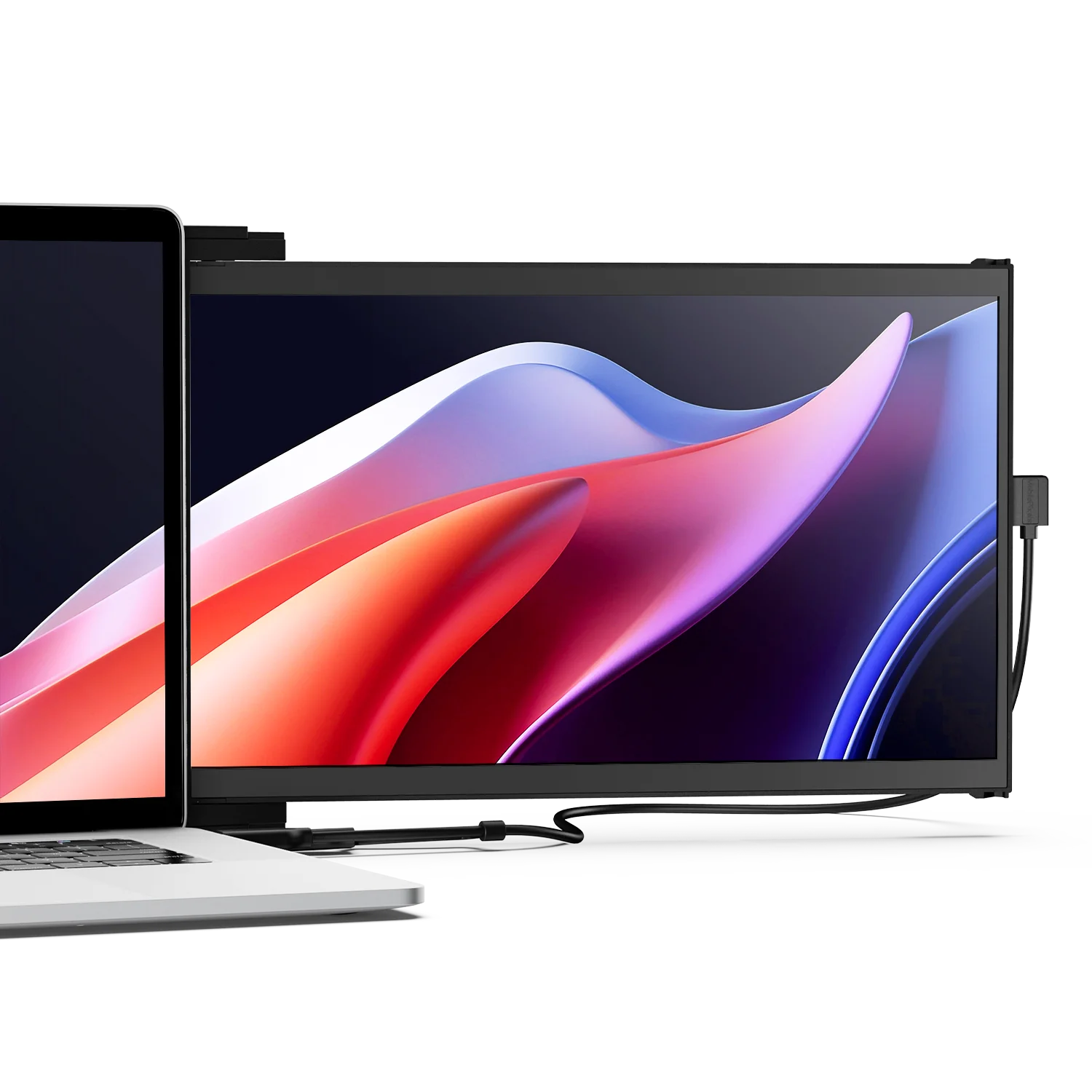
| Parameter | Manufacturer-listed specification |
|---|---|
| Display | 14.1-inch LCD |
| Resolution | 1920 × 1080 |
| Refresh rate | 60Hz |
| Weight | 1.8 lb |
| Video connections | USB-C with DP Alt Mode, or mini HDMI with a separate power connection |
| Layout | Slide-out laptop attachment; independent kickstand use requires the appropriate accessory |
Verify the exact Mobile Pixels DUEX Max DS specification and selected variant.
Mobile Pixels Fold 1080p

| Parameter | Manufacturer-listed specification |
|---|---|
| Variant | 15.6-inch 1080p |
| Panel | LCD / IPS |
| Resolution | 1920 × 1080 |
| Weight | 1.65 lb |
| Dimensions | 14.29 × 8.78 × 0.24 inches |
| Support | Magnetic cover that doubles as a stand |
| Video inputs | DP-capable USB-C or mini HDMI with appropriate power |
Verify the exact Mobile Pixels Fold 1080p specification and selected variant.
FAQ
How should I compare a slide-out laptop screen with Dell, Lenovo or HP independent portable monitors?
Choose DUEX when keeping a reference screen attached to one supported laptop matters most. Choose an independent Dell, Lenovo or ASUS when the panel must move between machines or sit away from the laptop. Compare complete delivered cost with the required stand, cables and power accessories; a low screen-only price is not the price of a ready-to-use workstation.
Does a USB-C connector guarantee that this setup works?
No. Confirm video output, power, cable direction, the supported operating system and the host external-display count for the exact model. Test the complete arrangement before relying on it away from home.
Choose the next step
Compare portable monitor layouts. Match the selected model to your device and workspace before ordering.
Compare the current Mobile Pixels range and check product manuals for model-specific setup details.
Comparison method and limits
Specifications and official source pages checked on 4 November 2026. This is a documentation-based buying guide, not a hands-on benchmark. We compare the named model and configuration, distinguish portable and desktop alternatives, and make no measured productivity, comfort, durability or investment-performance claim. Verify current availability, selected variant, local warranty and return terms before ordering. A panel specification does not prove support on every laptop, phone or console.
References
Discover Tech Gadgets


Leave a comment
This site is protected by hCaptcha and the hCaptcha Privacy Policy and Terms of Service apply.